Office on Macs and iPads has a July deadline. Inventory it now.
Microsoft's July 13, 2026 certificate deadline is not a data-loss scare. It is a fleet problem: old Office apps, unsupported OS versions, and users who may lose edit/save/create access at the wrong time.
Engadget picked up the uncomfortable version of this story last week: Office 2019 for Mac is headed for read-only behavior next month. I get why that headline travels. People bought software, the software still launches, and now an expiring license certificate can take editing away.
For an endpoint admin, the better question is quieter and more useful: which devices in your fleet are going to surprise you on July 13?
Microsoft’s own guidance says a licensing update for Microsoft 365 apps on macOS and iOS takes effect on July 13, 2026. Devices that are not updated to a supported app version can enter reduced functionality mode. Users can open, view, and print files, but they cannot edit, save, create new files, or use the full app features.
Microsoft also says this is not a security vulnerability, Windows and Android are not affected, and customer data is not at risk. Good. That still leaves a very real operations problem for managed Macs, iPhones, and iPads.
What Microsoft is actually saying
The minimum versions Microsoft lists for the certificate issue are pretty specific:
| Platform | Minimum OS | Minimum app version |
|---|---|---|
| macOS | macOS 12 Monterey or later | 16.83 or later |
| iOS / iPadOS | iOS 17.0 or later | 2.93 or later |
The important detail is that both sides matter. A Mac with an old Office build needs the app update. A Mac that cannot get to a supported OS may have a bigger problem. An iPad stuck below iOS 17 is in the same category.
That is where the easy answer stops working. Microsoft says support for Office 2019 for Mac ended on October 10, 2023, and the October 2023 update, version 16.78, was the last build supporting Office 2019 license types. Reinstalling Office 2019 is not a remediation plan if the required certificate update is not available to that license path.
There is also a second timeline hiding behind this one. Microsoft says Microsoft 365 for Mac, Office 2024 for Mac, and Office 2021 for Mac support the three most recent major versions of macOS. A device might clear the July certificate minimum and still be a bad long term support bet. Do not confuse “can get past July 13” with “is healthy for the next year.”
I would not start with the angry headline
The angry headline is tempting. Perpetual license, read-only, certificate expiration. You can already hear the comments section warming up.
I would start by seeing what the fleet actually looks like.
If you manage Macs or iPads, you need to know four things before the deadline:
- Which devices have Word, Excel, PowerPoint, Outlook, or OneNote installed.
- Which app versions are below 16.83 on macOS or below 2.93 on iOS/iPadOS.
- Which devices cannot reach macOS 12 or iOS/iPadOS 17.
- Which users are still relying on Office 2019 for Mac or other older non-subscription installs.
That last one may not be clean in every environment. Some places have tidy licensing. Plenty do not. You may need a mix of installed app inventory, receipts, license files, user interviews, procurement records, and a little ugly local scripting. That is normal endpoint work, unfortunately.
Separate the devices before messaging users
Before messaging users, figure out which devices actually need attention.
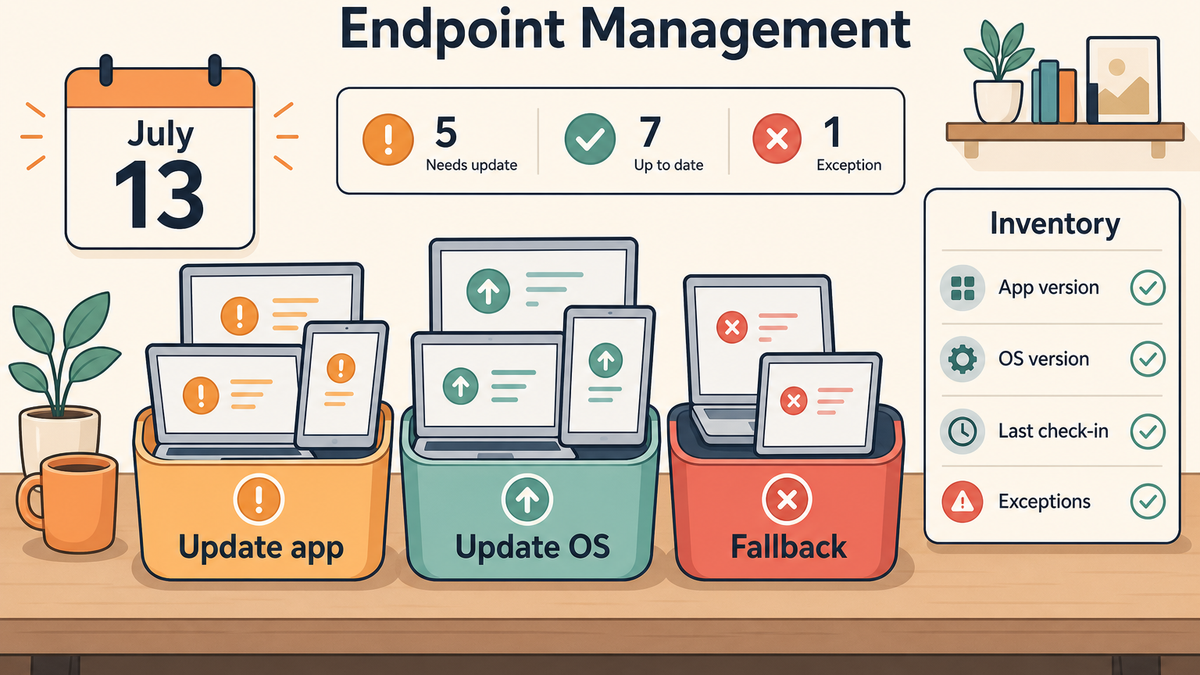
Update the app now. These are devices on a supported OS with Office/Microsoft 365 apps below the required version. On macOS, Microsoft documents msupdate, the command-line tool included with Microsoft AutoUpdate, for administrators who need to trigger or control Microsoft app updates. On iOS and iPadOS, the path is usually App Store or managed app update behavior.
Update the OS first. These devices can run a supported OS but are behind. This is where you need restart expectations, deferral rules, battery/power reality, and user communication. The app update is not the only step.
Replace, migrate, or change the workflow. Some devices cannot reach the OS requirement, or the Office license path is dead. For those, be honest early. Maybe the answer is newer hardware. Maybe it is Office 2024. Maybe it is Microsoft 365 on the web as a short-term bridge. Maybe it is moving a shared machine to a different role. The wrong answer is discovering this after a principal, CFO, teacher, or field tech opens a spreadsheet and cannot save it.
Watch for the weird exceptions. Lab Macs. Loaners. Library machines. Conference room iPads. Old executive laptops that never check in until travel week. The machines that hurt you are usually not the ones sitting politely in your main production Smart Group.
Where FileWave fits
This is the kind of problem where FileWave should make the admin work measurable: find the devices, sort the exceptions, push the fix where you can, and keep a report for the leftovers.
Use inventory first. FileWave’s Inventory Reports can collect device details, return fields you care about, and feed Smart Groups or scheduled reports. For app version comparisons on macOS, the FileWave KB has a specific pattern for Smart Groups, inventory, and application version numbers, including a Custom Field script that compares an installed app’s bundle version against a target version.
I would build reporting around the actual thresholds:
- macOS devices with Office apps below 16.83
- macOS devices below macOS 12
- iOS/iPadOS devices below iOS 17
- iOS/iPadOS devices with Microsoft apps below 2.93, where your inventory data exposes it
- devices with Office 2019-era installs or license evidence, if you can capture that cleanly
Then use Smart Groups for remediation: app update candidates, OS update candidates, unsupported devices, and machines that need human follow-up. FileWave can also help with the delivery side. The macOS software guidance covers deploying packages, scripts, files, and profiles through Filesets, and the iOS guidance covers VPP/App Store apps and profiles for managed iOS devices. I would still keep Microsoft AutoUpdate in the plan for Mac Office updates because it is Microsoft’s update mechanism. The management job is to trigger it, verify it, and catch the exceptions.
If you are responsible for Office patching, start with what the fleet actually shows. Which devices are current? Which ones are behind? When did they last check in? Once you know that, the follow-up gets a lot clearer: update what can be updated, clean up licensing where that is the blocker, move unsupported hardware into a replacement plan, and chase the machines that simply have not checked in or rebooted.
The user communication is part of the fix
The support article for work and school users tells people to contact their help desk if updates are managed or blocked, and it points them to Microsoft 365 on the web while they wait. That is useful, but only if your help desk knows what is happening before the tickets arrive.
I would send a plain internal note to the affected group, not the whole company:
- We found your Mac or iPad needs an Office/Microsoft 365 update before July 13.
- Your files are safe. This is a license certificate/app update issue, not data loss.
- If you do nothing, Office apps may let you open files but not edit or save them.
- Here is when IT will update the app or OS.
- If your device cannot be updated, here is the fallback plan.
That is enough. No drama, no blame, no twelve-paragraph explanation of certificate chains.
The practical takeaway
This deadline is easy to dismiss as a Microsoft licensing annoyance until you remember how many old Macs and iPads survive in real fleets. Shared devices. Department purchases. Machines kept alive for one workflow. Personal-ish Macs that somehow became business critical.
Do the inventory now. If every device is current, great. You have proof. If not, July 13 is close enough that the exceptions need names, owners, and a remediation plan.
Sources
- Certificate update for Microsoft 365 apps on managed macOS and iOS devices, Microsoft Learn
- Update Microsoft 365 or Office on your macOS or iOS device, Microsoft Support
- Update Microsoft 365 on your work or school macOS or iOS device, Microsoft Support
- End of support for Office 2019 for Mac, Microsoft Support
- Update Microsoft applications for Mac by using msupdate, Microsoft Learn
- Upgrade macOS to continue receiving Microsoft 365 and Office for Mac updates, Microsoft Support
- Inventory Reports, FileWave KB
- Smart Groups, Inventory and Application Version Numbers, FileWave KB
- macOS Software and Profiles, FileWave KB
- iOS Software and Profiles, FileWave KB
- Microsoft Office 2019 for Mac will become read-only next month, Engadget