Before you restore or wipe a failed endpoint
Most failed endpoints belong in the recovery queue. A few need a security handoff first. Smaller IT teams need a clear stop rule, not a forensic lab.
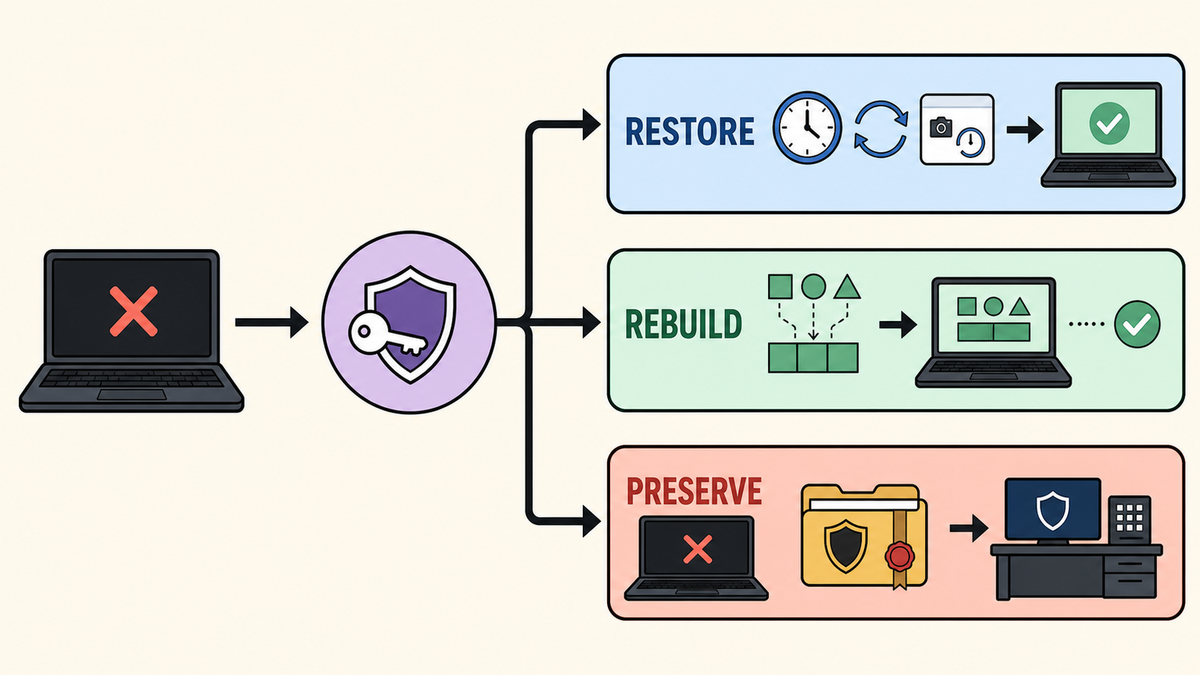
A teacher's laptop stops booting after an update. A professor needs files before class. The person who runs payroll cannot sign in. The normal support response is to get the device working again as quickly as possible.
Most of the time, that is exactly right.
But if the failed device also has an endpoint-security alert, unexpected encryption, an unfamiliar login, or some other sign of compromise, the fastest repair can destroy the information needed to understand what happened. A reboot, rollback, restore, or wipe may erase local work too.
The endpoint admin's job is not to become a forensic investigator. It is to recognize when ordinary recovery has become a security handoff before clicking the button that cannot be undone.
Small IT teams need a stop rule, not an enterprise process
Enterprise IT may already have a security operations center, incident commander, legal team, evidence procedures, and people authorized to take systems offline. Many K-12 districts, colleges, and small businesses do not. One person may manage devices, accounts, networks, backups, and the help desk.
That does not make the decision less important. It changes what a useful runbook should ask that person to do.
The UK National Cyber Security Centre says incident planning matters whether an organization has 10 people or 10,000. Its basic advice starts with contacts, escalation criteria, decision authority, and simple instructions for the first few hours. The advanced technical work comes later and may belong to someone outside the organization.
For a smaller IT team, the recovery card needs five things:
- Conditions that stop ordinary recovery.
- A named person or service to call.
- Containment actions the admin is already authorized to take.
- A short record of what was observed and what has already changed.
- A spare-device path so the user can keep working while the decision is made.
That is enough to prevent improvisation at the worst possible time.
Decide whether this is break/fix or a security handoff
A known and reproduced change can usually stay in the normal recovery queue. An application install failed. A driver update broke boot. A policy change produced the same problem on a test group. There are no related security alerts or unexplained account events.
Stop ordinary recovery and use the security handoff when any of these are true:
- Endpoint protection, identity monitoring, or another trusted source reports likely compromise.
- The user reports unexpected encryption, an unfamiliar login, security controls being disabled, remote-access software they did not install, or files changing without explanation.
- Similar unexplained failures are appearing on multiple devices.
- The device may contain sensitive student, employee, customer, health, or financial data, and compromise has not been ruled out.
- The failure occurred during an active security event or after someone asked IT to preserve affected systems.
- The admin cannot explain the device's current state well enough to trust the proposed restore source.
A hardware failure by itself is not a security incident. A single low-confidence alert may be a false positive. The admin does not need to prove compromise before escalating, though. The stop rule exists because destructive recovery is a bad way to find out the alert was real.
Know who gets the handoff
"Call security" is not a plan when there is no security department.
The contact might be an internal security team, a district or university security office, an MSP or MSSP, the cyber-insurance carrier's breach hotline, or an incident-response company approved by the insurer. Leadership, privacy, legal, or communications staff may also need to be involved, but the first-touch admin should not be figuring out that sequence during the incident.
Write down the primary and backup contacts, how to reach them if normal email is unavailable or untrusted, and who has authority to approve recovery. Check the cyber-insurance policy before an incident; some carriers require notification or the use of approved responders before outside work begins.
The FTC's small-business guidance follows this more realistic model: prepare a response plan, keep the business running, coordinate with relevant third parties, and consult a trusted security professional when the work exceeds the team's capability.
Pre-authorize the first containment action
The handoff card should also say what the endpoint admin may do immediately.
For example, the approved first action might be disconnecting Ethernet and Wi-Fi while leaving the device powered on. That choice is environment-specific. During a ransomware event that is actively spreading, containment may be more urgent than preserving every volatile artifact. CISA's ransomware response checklist prioritizes isolation, including network-level isolation when several systems are affected. It says to power down devices only when other isolation is not feasible to stop the spread, while warning that shutdown can destroy evidence held in memory.
The right action depends on the incident and the environment. Decide it before the incident rather than letting each technician invent a response.
Unless the runbook or responder directs otherwise, the admin should not experiment by repeatedly rebooting, restoring, wiping, reconnecting, or running collection scripts found during a web search. Even a well-intended action changes the device and complicates the handoff.
Give the responder a clean record
The admin does not need a chain-of-custody system to make a useful handoff. A ticket with basic facts is far better than a device arriving with the explanation, "It was acting weird, so I tried a few things."
Record:
- The device, assigned user, location, and time the problem was discovered.
- What the user saw or did immediately before the failure.
- The last known update, deployment, policy change, or application installation.
- Any endpoint, identity, email, or network alert associated with the device or user.
- Whether the device is still powered on and connected to any network.
- Every action already taken, including reboots, scans, isolation, rollback attempts, or password changes.
- Whether important work exists only on the device.
- Who received the handoff and when.
A timestamped inventory report from the endpoint-management platform can help describe the device's known state before recovery. If FileWave manages the endpoint, an Inventory Report can be attached to the ticket and compared with fresh inventory later. It is useful operational context, not a forensic image and not authorization to proceed.
Recovery tools are supposed to change things
Modern recovery features are effective because they replace or revert state. That is also why they should not be the first move when compromise is possible.
- Microsoft's Windows point-in-time restore can return the operating system, applications, settings, and local files on the OS volume to an available point from the previous 72 hours. Changes after that point are lost, and an encrypted device requires its BitLocker recovery key.
- Google's managed ChromeOS rollback rolls the operating system back to a target version. The device restarts, wipes all local data including Downloads, and re-enrolls into the organization's account.
- Apple's Return to Service securely erases user data on supported devices and then reconnects and re-enrolls them. Newer app-preservation options can retain managed app binaries across the erase to speed redeployment, but they do not turn the process into evidence preservation.
- A full wipe and rebuild removes the current installation entirely. It may be the correct recovery action later, but it should be a deliberate choice rather than the default response to unexplained behavior.
These tools are recovery mechanisms. They are not investigation tools.
Let the responder own the incident decisions
The NCSC's technical response guidance separates minimum preparation from advanced evidence work. A small team should know what logs and management data exist, how to retrieve them, and which specialist can help with anything beyond that.
After the handoff, the responder decides what evidence is needed, whether other devices or accounts may be involved, what containment is safe, whether credentials or keys must change, and when rebuilding may begin. They may also coordinate insurer, legal, privacy, regulatory, or law-enforcement requirements.
That leaves the endpoint team with work it already knows how to do: provide a spare, maintain the ticket, preserve the device as directed, and wait for recovery clearance.
A spare device is not just a customer-service nicety here. It removes the pressure to wipe first because a principal, teacher, professor, executive, or payroll clerk needs to get back to work.
Resume recovery with a known owner
For an ordinary break/fix case, the endpoint admin can restore or rebuild using the normal process. For a security handoff, recovery starts after the responder says what can be changed and what may return to the device.
After a restore or rebuild, confirm that:
- Enrollment, disk encryption, endpoint security, required profiles, applications, and updates are back in place and reporting correctly.
- User data resynchronizes without overwriting newer cloud data or restoring content the responder excluded. "Backed up" does not mean "trusted."
- The original problem is gone and the user can complete the work the device exists to support.
When a security responder was involved, also record who authorized reconnection and what monitoring is required afterward. A device that boots and checks in is not automatically a trusted device.
A smaller team does not need to copy an enterprise incident-response process. It needs a card that says: stop here, take only these actions, call this person, record these facts, and give the user this spare.
That is the difference between moving quickly and wiping away the one clue that showed the failed endpoint was part of something larger.
Sources
- NCSC: Plan your cyber incident response processes
- NCSC: Develop technical response capabilities
- FTC: Cybersecurity for Small Business
- CISA: I've Been Hit By Ransomware
- Microsoft: Point-in-time restore for Windows
- Google: Roll back ChromeOS to a previous version
- Apple: Use Return to Service for Apple devices
- FileWave: Inventory Reports