Review AI-written endpoint scripts like software packages
An AI-written PowerShell or shell script becomes software your organization owns when it runs as SYSTEM or root across managed devices. Review the scope, evidence, and rollback before deployment.
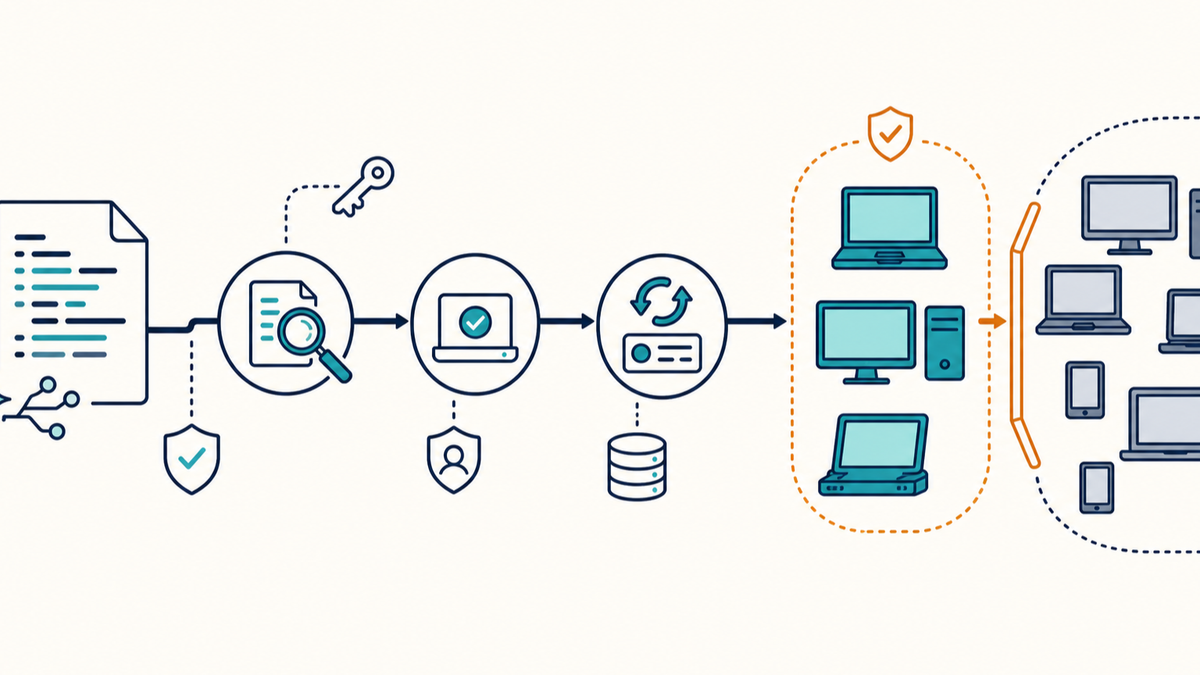
Microsoft recently ran a session about the AI-powered admin: AI surfacing problems, recommending fixes, and automating routine endpoint work.
We do not have to wait for the product roadmap. Admins already ask ChatGPT, Copilot, Grok, and other tools to write PowerShell or shell scripts. The script may be twenty lines long. Once a management system runs it as SYSTEM or root across hundreds of devices, it is software your organization owns.
The AI did not choose the deployment scope. It will not take the support call if the script changes the wrong registry key, runs in the wrong user context, deletes more than expected, or reports success without fixing the problem. That part belongs to the admin who deployed it.
Start with a script review card
Before I put an AI-written script into an endpoint-management system, I want a short record that another admin can understand without the chat transcript.
| Field | Question to answer |
|---|---|
| Purpose | What exact problem should this script fix? |
| Owner | Who reviewed it and who handles failures? |
| Precondition | What must be true before the script changes anything? |
| Execution context | Does it run as the signed-in user, an administrator, SYSTEM, or root? |
| Change scope | Which files, settings, services, accounts, packages, or processes can it touch? |
| Postcondition | What device state proves the fix worked? |
| Evidence | What will the script log or return to the management system? |
| Rollback | How do you restore the previous state if the change fails? |
| Deployment limit | Which test devices go first, and what stops the script from reaching the rest? |
| Data handling | Could logs, prompts, arguments, or output expose credentials, tokens, customer data, or internal details? |
For a script that repairs a stopped VPN service, the precondition might be: the approved client version is installed, its service exists, and the service is not running. The change should be limited to that service. The postcondition should confirm the service is running and the expected health check succeeds. If the script changes the startup type, it should record the old value so it can restore it.
Exit 0 is useful, but it is not proof by itself. The script should return success only after it checks the resulting device state.
Some changes cannot be rolled back by another script. File deletion, account removal, disk changes, and broad permissions changes may require a backup or reimage path instead. If the recovery method does not exist, narrow the change or stop before deployment.
Review it for endpoint reality
AI-generated code can look finished while making assumptions that do not fit your fleet. GitHub's guide to reviewing AI-generated code calls out hallucinated APIs, ignored constraints, suspicious dependencies, and code that looks right without matching the intent. GitHub's Copilot Chat responsible-use guidance says generated code should be reviewed and tested for errors and security problems.
For endpoint scripts, I would check a few things that normal application tests may miss:
- Does the command exist on every supported OS and PowerShell version in the target group?
- Does 32-bit versus 64-bit execution change the registry or file-system path?
- Does the script expect an interactive user session even though the management agent runs in the background?
- Does it assume the device is on the corporate network, connected to VPN, or able to reach an external package source?
- Does it handle a missing file, service, user profile, package, or registry path without creating a different problem?
- Is it safe to resume or run twice? A student may close the laptop, leave the network, and check in again weeks later after only part of the script ran. A remediation that is safe only on a clean first attempt is not ready.
- Does it preserve the state needed for rollback before making the change?
- Does it write secrets, access tokens, usernames, file contents, or customer details into the management log?
I would also read every destructive command separately. File deletion, recursive permissions changes, package removal, account changes, disk operations, and security-tool exclusions deserve more than a quick scan of the full script.
If nobody on the team understands a command, the answer is not to ask the same model whether its own code is safe. Check the vendor documentation, test the command on an expendable device, or replace it with something the team can support.
Signing proves origin, not correctness
Microsoft's PowerShell signing documentation puts the risk plainly: scripts have the same effect as executable programs. Microsoft recommends reviewing the commands before trusting or signing a script.
Code signing is worth using when your Windows environment can support it. It gives you integrity and publisher information, and an AllSigned policy can prevent unsigned scripts from running. A valid signature does not prove that the logic is correct, the scope is appropriate, or the rollback works. It proves that the signed content has not changed and identifies the signer trusted by the device.
The useful sequence is review, test, approve, sign, and deploy. Signing a script straight out of a chat window only gives a bad change a trusted publisher.
NIST's Secure Software Development Framework is written for software producers, but the relevant practices transfer cleanly to internal endpoint automation: review and test code, protect its integrity, preserve the artifacts, and respond when a released change causes a problem. CISA's Software Acquisition Guide is a questionnaire for government buyers evaluating suppliers, not an internal IT standard. It now asks whether suppliers control AI-generated code and AI-powered toolchains. That is also a reasonable question to ask about scripts your own team deploys.
A small FileWave pattern
In FileWave, the privilege context is explicit. Its Custom Fields documentation says client scripts run as root on macOS and SYSTEM on Windows. That is useful for collecting state and repairing devices. It is also why a pasted script deserves a real review.
I would separate detection from remediation:
- Create a detection-only Custom Field that returns a short state such as
healthy,needs-remediation, orunknown. It should not change the device. - Build a Smart Group for
needs-remediationand preview the actual members before associating any corrective Fileset. - Start with a small group of representative devices. Include at least one normal device, one older supported device, and one device where the precondition is false.
- Let the remediation Fileset change only the documented state. Give the script a version number and record it in the Fileset name or a dedicated Custom Field.
- Use a separate postcondition check to confirm the desired state. FileWave's Smart Group documentation describes the useful behavior here: when inventory reports that a device no longer meets the criteria, it drops out of the dynamic group.
- Stop broad deployment if the test group returns
unknown, produces unexpected membership, or cannot restore the prior state.
Script-based Custom Fields and this Fileset pattern apply to managed macOS and Windows devices. iOS, iPadOS, and ChromeOS need platform-appropriate status and remediation methods rather than local root or SYSTEM scripts.
The broader pattern is not unique to FileWave. Any endpoint-management system should let you separate detection, targeting, execution, and evidence. The management console saying a script ran is only one piece of that evidence.
Keep the artifact after the chat is gone
Save the final script in source control or another system that preserves versions and review history. Keep the review card with it. Record the AI tool only as provenance, not as the owner.
For each deployed version, I would preserve:
- the exact script or artifact hash;
- the reviewer and approval date;
- the test devices and results;
- the management-system assignment or target group;
- the expected log path and postcondition value;
- the rollback instructions;
- the date the script should be removed or reviewed again.
That record helps when the original admin is out, the prompt is gone, the device checks in three weeks late, or a later OS update changes the command's behavior.
AI can get an admin to a useful first draft quickly. It can also produce code that fails in ways a quick scan will not catch.
If the script's scope, evidence, and recovery path are missing, the script is still a draft.